![Web-colour (1).png]](https://support.loylap.com/hs-fs/hubfs/Web-colour%20(1).png?width=104&height=50&name=Web-colour%20(1).png)
1) Once the Merchant has an Authipay account, request that the Merchants AIBMS rep to request Fiserv 'api key' and 'api secret' which they can do by emailing authipay@aibms.com. If you are unsure of the AIBMS rep is, the Merchant can also request this data directly if they are the named contact for AIBMS.
2) Once API key and secret is received by the AIBMS Rep/Merchant, log in to the Merchants Dashboard and Navigate to - Settings -> Online Payments - and click edit beside the Authipay option.
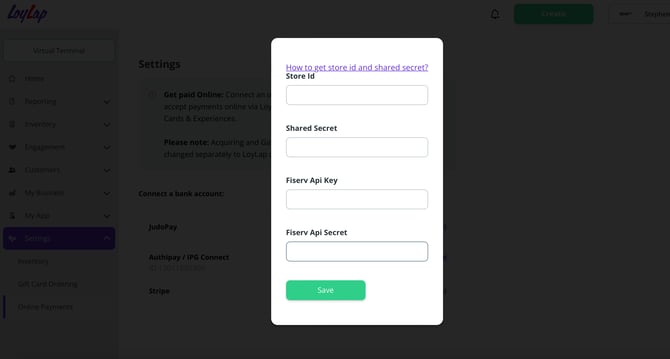
3) Copy and Paste in the API Key and API secret to the required fields and click 'Save'
4) Go to the merchants profile on LoyLap and attempt to load EUR 5 using Apple/Google pay and ensure the transaction is successful.
If unsuccessful, contact Conor/Roland with the API details